PluginRx Control Center brings every WordPress site you look after into one dashboard. Install it on each site and answer one question during setup: is this site the Host (it runs the Control Center), an Agent (it is managed by a Control Center), or Both?
The Control Center (host)
See every site at a glance: WordPress and PHP versions, available plugin, theme and core updates, admin users, WP_DEBUG status, response time, SSL expiry and more.
Run updates for WordPress, plugins and themes, and actions from supported plugins, on one site or a whole group at once.
After every action the site is checked again, with a fresh screenshot, so you can see it still works.
Organize sites into groups, sort them alphabetically or by drag and drop, and jump straight to any site.
Arrange the dashboard widgets with the Widget Manager, and choose what you see with Display Options.
Ignore a warning on one site without hiding it on the others (for example, a site that never sends email).
Keep notes on each site, and add your own quick links (hosting, repository, analytics) with Link Fields.
Check All runs one site at a time by default, or several at once if you prefer.
Connection diagnostics explain exactly why a site cannot be reached and how to fix it.
Optional single-use login links take you straight into a site's dashboard.
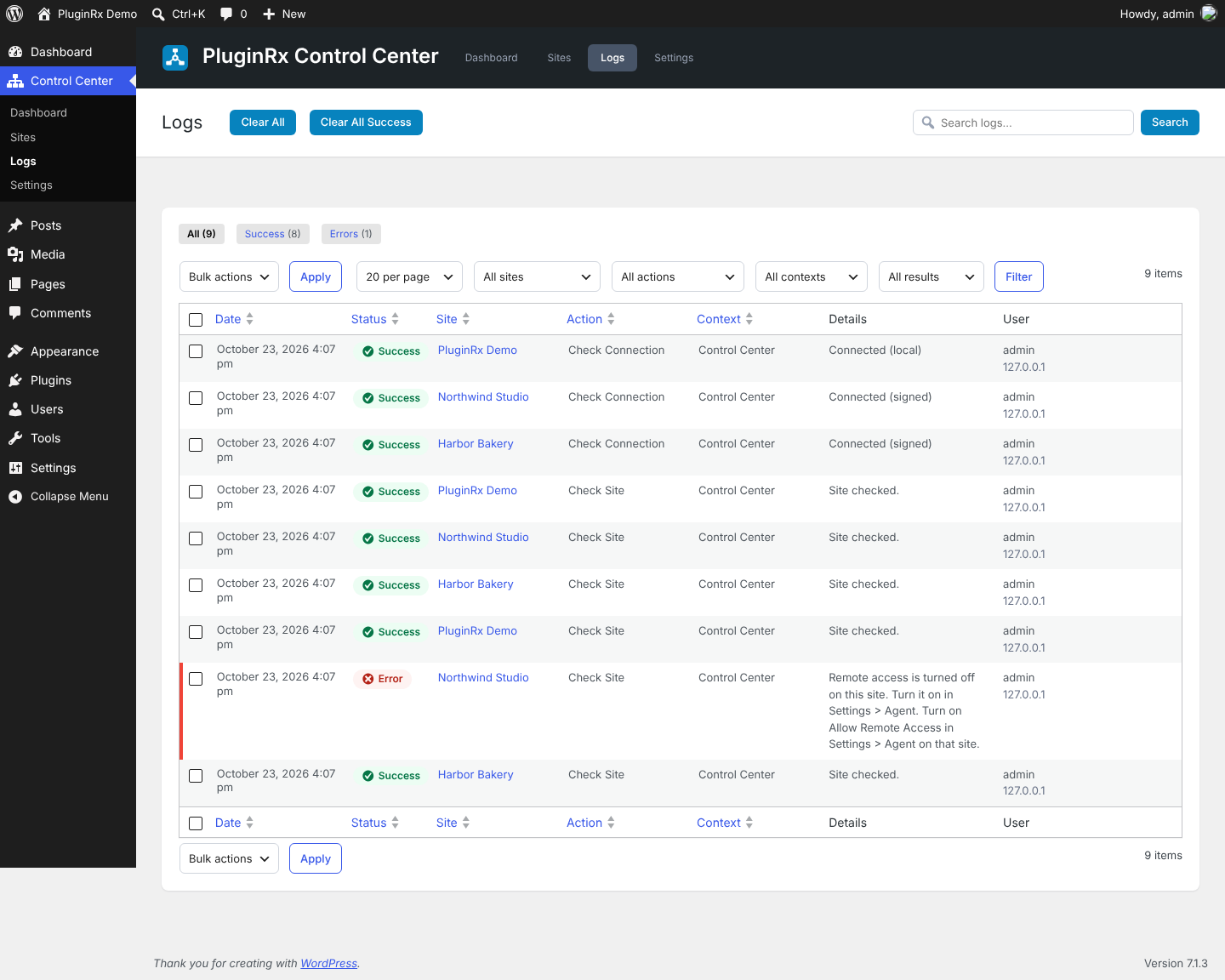
Detailed logs with filters for site, action, context and result, and automatic cleanup.
The Agent
Nothing is shared until you turn on remote access, list the Control Center domains you trust and add the API key.
Choose exactly what is shared and which actions are allowed. New installs share only version and update information.
See this site exactly as the Control Center sees it on the agent's own dashboard.
Every action, remote login and failed connection attempt is logged on the agent too.
Security
Requests are signed with the API key (HMAC-SHA256). The key itself never travels over the network.
Signed requests expire after five minutes and can only be used once.
Only allowed Control Center domains are accepted, and repeated failures from one server are blocked for 15 minutes.
Remote login links are single use, expire after 60 seconds, and log in as the one administrator account you choose.
Older Control Centers (version 1.x) can keep connecting with the key header until you turn on "Require Signed Requests".
Multisite
Network-activate the plugin to run the Control Center from the network admin (or from one chosen site). Subsites on the same network are read directly, without API keys, and new subsites can be added automatically.
Integrations
Supported plugins add their own widgets and actions automatically:
Clear Cache Everywhere: hosting cache URL, clear every cache
Broken Link Notifier: broken link count
Fake User Detector: flagged accounts
Advanced Tools for Gravity Forms: form spam count, delete spam
WP Mail Logging: failed emails, purge failed emails
Admin Help Docs: the Control Center uses its color scheme
Developers can add their own requests, actions and widgets with the prxctrl_integrations filter.
Third-party Services
This plugin connects to the following services. No personal data is sent.
WordPress.com mShots (s0.wordpress.com/mshots) renders the site screenshots on the Control Center dashboard. The public URL of each managed site is sent when its screenshot is shown or refreshed. Screenshots can be turned off in Settings > Host. Terms of Service and Privacy Policy.
WordPress.org API (api.wordpress.org/core/version-check/1.7/) provides the latest WordPress version, used to flag outdated sites. It is requested at most twice a day, only when a dashboard or settings page is viewed. Privacy Policy.
PHP.net (www.php.net/releases/?json) provides the latest PHP version, used to flag outdated sites. It is requested at most twice a day, only when a dashboard or settings page is viewed. Privacy Policy.
The Control Center also connects to the sites you add, and agents only respond to Control Centers you allow. Those are your own sites, not third-party services.
Screenshots
❮Choose your site role❯
×
FAQ
Is this safe to install on production sites?
Yes. An agent only responds to signed requests from domains you list, and only shares or runs what you allow. It cannot run arbitrary code or write arbitrary files.
Can I limit what the Control Center can do?
Yes. Every piece of data and every action is a separate permission in Settings > Agent.
Does remote login bypass two-factor authentication?
Yes, which is why it is off by default and requires choosing a specific account. Only turn it on if you trust everyone who can open your Control Center.
Can other roles use the Control Center?
Administrators always have access. You can give other roles access to the Dashboard, Logs and Sites pages in the Access settings. Settings pages are limited to administrators.
Does this use XML-RPC?
No. Communication uses the WordPress REST API.
Installation
1. Install and activate the plugin on every site you want to manage, including the site that will run the Control Center.
2. On the setup screen, choose Host (or Both) for the Control Center site and Agent for the others.
3. On each agent: open Control Center > Settings > Agent, turn on Allow Remote Access, add the Control Center's domain, choose permissions and generate an API key.
4. On the host: open Control Center > Sites, click Add New Site and paste the site's URL and API key.
2.0.0.1
Fix: Site thumbnails showed the "generating" placeholder instead of the screenshot after a site was checked. A new screenshot is now only used once it has finished rendering, and the last good one stays until then.
Fix: Connection checks failed with "unexpected response" on sites where the REST API only works through ?rest_route= (plain permalinks). The Control Center now retries that way before reporting an error.
Fix: Choosing "Both" during setup did not add the current site to the Sites list.
Tweak: The Sites page no longer shows an empty "No Group" row or extra space above the first group.
2.0.0
New: PluginRx Control Center and PluginRx Agent are now one plugin. Choose Host, Agent or Both during setup, and switch any time in Settings.
New: Free and GPL licensed. The license system and private updater were removed.
New: Signed requests (HMAC-SHA256) with replay protection. The API key is no longer sent over the network. Older agents and hosts keep working on the legacy protocol.
New: Sites page with add/edit modals that save right away, groups (create one from the site modal too), custom drag and drop sorting, connection checks with plain-language diagnostics, and Link Fields shown as quick links.
New: Dashboard accordions, Expand All and Collapse All, Display Options, a plugin, theme and admin search that lists which sites have it and which don't, group actions, site notes, and per-site ignorable warnings.
New: Widget Manager to arrange dashboard widgets and disable the ones you don't need.
New: Response time and SSL certificate expiry checks for every site.
New: Optional single-use remote login links that work alongside two-factor and hide-login plugins.
New: The agent's own dashboard shows exactly what it shares, in the same widget layout as the Control Center.
New: Logs page per-page choice, site, action, context and result filters, search, Clear All, Clear All Success and automatic cleanup after a number of days.
New: Agent logs show the IP address of the requesting server and the name and email of the person who made each request.
New: One Settings page with Host, Agent and Site Role tabs: sorting, version warning levels, SSL warning days, inactive admin warnings, sites checked at once, date format, timezone and roles with access, plus download, upload and reset.
New: Multisite support with the Control Center in the network admin or on one site.
New: Developer hooks, including prxctrl_integrations for adding requests, actions and widgets in one place.
New: The Admins widget shows your user ID on a site when an admin there has your email.
Tweak: Inherits Admin Help Docs colors, and matches its header, subheader and containers.
Tweak: Checking a site is much easier to see, with a moving striped bar, a spinner and text, not just color.
Tweak: Action buttons are only enabled when the site was checked in the last hour, there is something to do and the agent allows it. Buttons for plugins that are not active on a site are hidden.
Tweak: Fresh installs share only version and update information until you allow more.
Tweak: The dashboard loads with a fixed number of database queries regardless of how many sites you manage.
Fix: Editing a site's URL created a new site and deleted the old one's data.
Fix: Removed plugins, themes and admins stayed listed after a re-check.
Fix: Theme and WordPress updates could fail with "Call to undefined function request_filesystem_credentials()".
Fix: Plugin updates tried to update every plugin instead of only the ones with updates.
Fix: AJAX requests and log deletion now check permissions and nonces.
Fix: Data from managed sites is escaped everywhere it is shown.
Deprecated: The prxcntrl_integration_requests, prxcntrl_integration_actions, prxagnt_integration_requests and prxagnt_integration_actions filters still work but log a deprecation notice. Use prxctrl_integrations instead.
1.1.0
Update: Removed license key requirement and licensing system
Tweak: Plugin updates now check for new versions without license validation
1.0.6
Fix: Update broken link notifier link
Fix: If "Allow previous versions..." is unchecked for WP and PHP versions, it wasn't highlight red on patch difference
Fix: Action buttons not re-enabling after check all functionality is done
Update: Added a home/admin linked icon next to Site URL
Tweak: Plugins and themes boxes now turn red if needing updates
1.0.5
Fix: Validating license returning an error after clearing transients
1.0.4
Tweak: Added alert confirmation to action buttons
Update: Added host cache plugin request
Update: Added admin users request
Update: Added a hook to allow changing the menu name of the control center
Update: Added progress of checking all sites at the top